Keep your Mac awake.Let the screen rest.

Koffee keeps your Mac from going to sleep while an agent, a build, or a download is still running. When you walk away, the screen dims. Touch the mouse and it's back.

Awake · dims in 10:00

Off · your Mac sleeps on its usual schedule

Go ahead, flip it.

Download on the Mac App Store

Requires macOS 26 or later.

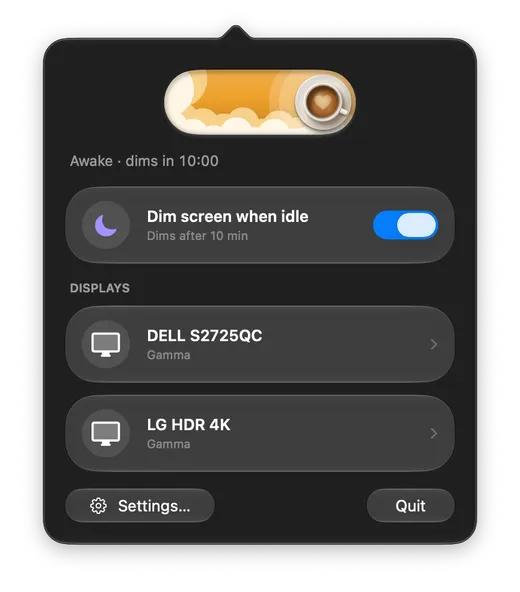
Lives in your menu bar

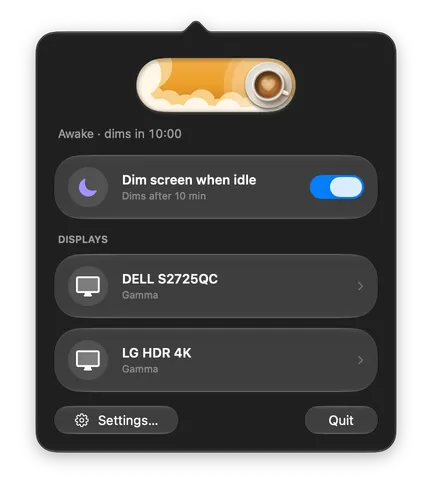
The Koffee panel: the Awake switch, a status line, the dimming option, and a card for each display.
Why

The usual problem

You hand your coding agent a long task and go to bed. Either the Mac falls asleep and the agent stalls an hour in, or you turn sleep off and the screen glows until morning for nobody.

Koffee keeps the Mac working and dims the screen until you come back.
3 steps

How it works

  1. 1Keep

    Turn the switch on. Koffee asks macOS not to sleep, so agents, builds, and downloads keep going.

  2. 2Fade

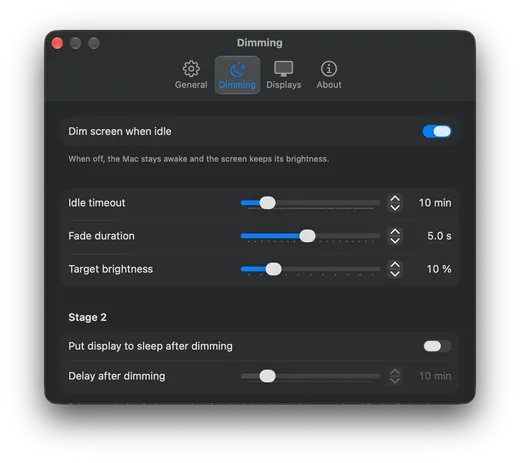
    After 10 minutes with no keyboard or mouse input, the screen dims over a few seconds. You set the delay and how dark it gets.

  3. 3Return

    Move the mouse or press any key. The brightness comes right back.

Features

The details

  • Wakes on any input

    Mouse, trackpad, keyboard, even the brightness keys. No lock screen unless you've set one up.

  • Waits during video and calls

    If another app is keeping the display on, Koffee doesn't dim. The status line tells you which app.

  • Dimming is optional

    Turn off "Dim screen when idle" and Koffee only keeps the Mac awake. The screen stays as it is.

  • Can pause on battery

    Turn on "Only when connected to power" and a switch you forgot about won't drain the laptop in your bag.

  • Display sleep, if you want it

    After the screen has been dim for a while, Koffee can let macOS put the display to sleep. The Mac keeps running. Off by default.

  • Flip it your way

    Click the cup in the menu bar, swipe the switch, or set a global hotkey.

  • Works on every display

    Each connected display gets its own card in the panel and its own dimming method in Settings.

  • Puts everything back

    Your display settings are restored when you return, quit, log out, or unplug a monitor. If Koffee crashes, macOS goes back to its normal sleep rules.

Native

Made for macOS 26

Koffee uses the Liquid Glass look and standard system controls, so it fits in with the rest of Tahoe. It runs in the App Sandbox and never connects to the internet.

  • Sandboxed
  • No account
  • No network access
  • No analytics
Screenshots

What it looks like

  • The Koffee panel in dark mode with the Awake switch on, the status line, and two display cards.
    One switch, a status line, and a card for each display.
  • Settings, Dimming tab: sliders for idle timeout, fade duration, and target brightness.
    Set when the screen dims, how fast, and how dark.
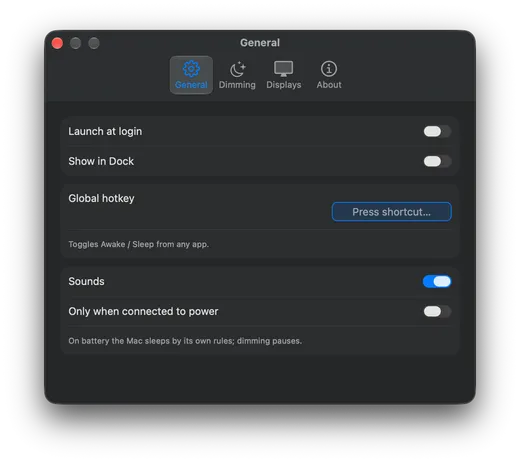
  • Settings, General tab: launch at login, show in Dock, global hotkey, sounds, and only when connected to power.
    Launch at login, a global hotkey, sounds, and the battery option.
Fine print

What it doesn't do

Koffee dims the picture, not the backlight. On most LCD displays that won't lower power use or make the panel last longer. Only OLED and mini-LED screens get that benefit. What you get is a darker room and a Mac that's still working when you return.

Koffee can't overrule macOS either. Closing the lid with no external display, a critically low battery, Low Power Mode, and update restarts will still put the Mac to sleep.

FAQ

Questions

What does Koffee do?

It keeps your Mac awake while the switch is on. After a few idle minutes it dims the screen, and any input brings the brightness back.

Will my agents, builds, and downloads keep running?

Yes. Dimming only changes the picture. The Mac keeps working.

Does dimming save energy?

On most LCD displays, no. Koffee dims the picture, not the backlight, so power use stays about the same. OLED and mini-LED displays do draw less when the picture is dark.

Why does it need macOS 26?

Koffee is built on the macOS 26 interface and frameworks. There's no version for older releases.

Does it work with external monitors?

Yes. Every connected display dims. If a display doesn't support the default method, Koffee uses an overlay instead and marks that display in the panel.

Why didn't it dim while I was watching a video?

Another app asked macOS to keep the display on. Koffee waits and picks up again when that app is done.

What happens when I close the lid?

That's up to macOS. Without an external display and power, a closed lid puts the Mac to sleep whether Koffee is on or not.

Does Koffee collect any data?

No. The app has no network access, no analytics, and no account.

Koffee app icon

Get Koffee

Available on the Mac App Store. Works on Apple silicon and Intel Macs. Requires macOS 26 or later.

Download on the Mac App Store

Contact us

Questions, bugs, privacy requests. We reply by email.

With country code, like +1 555 123 4567.

Topic

Text only. The form can't take attachments.

A picture with digits to type into the field next to it

We use this only to answer you. See the Privacy Policy.